
Step-by-step tutorial
How to make a handwriting animation video in Chrome
Start with ordinary text, choose how the writing should look, build one or more scenes, preview the motion, and export a finished handwriting video.
1. Start a new handwriting project
Open the extension and create a blank project or begin from a template. Give the project a clear name before you build multiple scenes so it is easier to find in Projects later.
2. Type or paste your script
Select a text box and enter the words you want to animate. Keep short-form scenes concise when you want viewers to follow every written word, or split longer scripts across multiple scenes.
3. Choose a pen, pencil or feather quill
Open the visual pen picker and choose the instrument that suits the scene. Ballpoint and fountain pens work well for general writing, markers suit whiteboard-style explanations, while the White & Gold, Peacock and Burgundy quills create a more decorative writing effect.
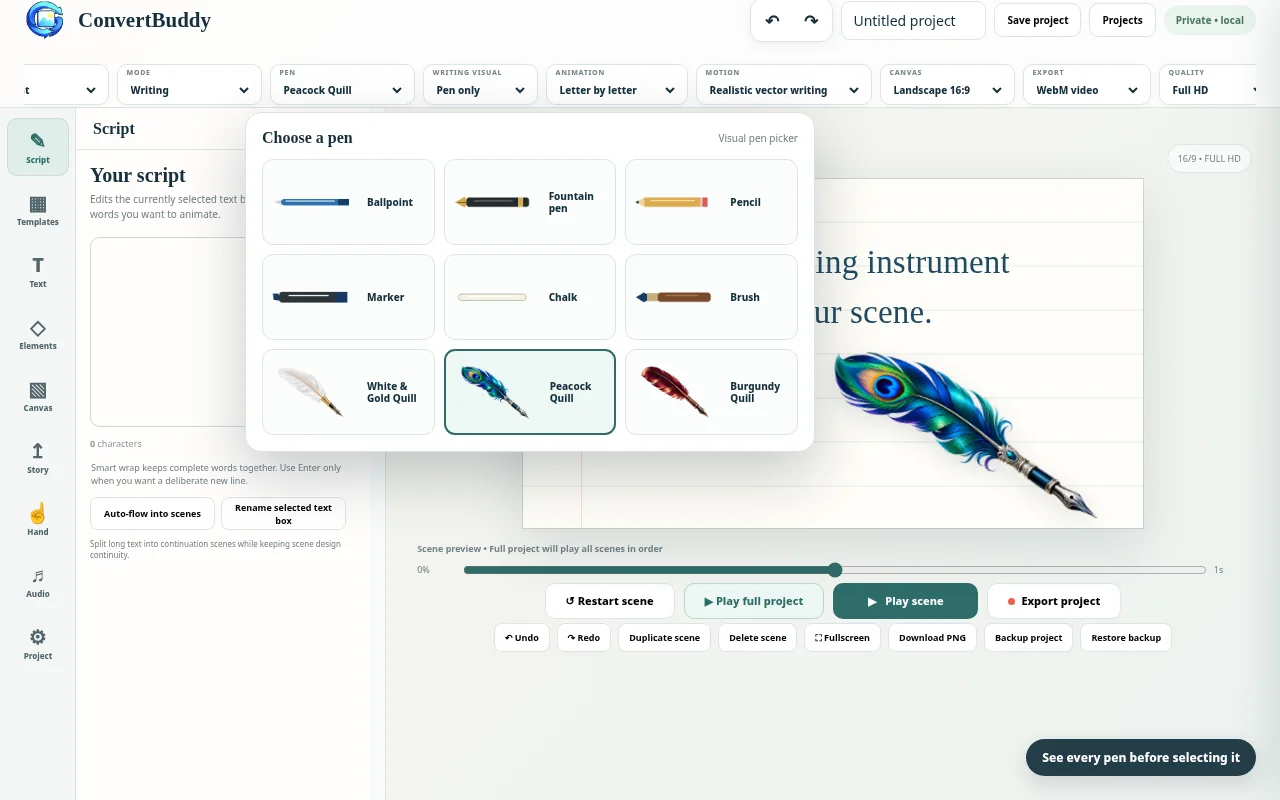
The selected instrument remains visible in the Pen control.
4. Choose Hand + Pen, Pen Only or Text Only
For a realistic writing demonstration, use Hand + Pen. If you want the instrument without the hand, choose Pen Only. Text Only keeps the writing animation but removes the moving writing tool.
5. Design the scene
Choose the canvas ratio before final positioning. Use 16:9 for standard landscape video, 9:16 for Shorts and other vertical videos, 1:1 for square content, or 4:5 for portrait posts. Then choose a paper style, color, gradient or user-selected background image and adjust text placement.
6. Preview the writing
Use Play Scene while adjusting one scene and Play Full Project when checking the sequence. Review the ending of each scene so the final letters are visible before transitions or the project ending.
7. Export the finished project
Open Export Project, select the range, choose WebM or MP4 where supported, then choose output quality. Full HD is a practical default; 4K gives a larger output but requires more processing time and memory. Use GIF for silent looping animation or PNG for a still scene.